Sell everywhere.
Never sell what you don't have.
Stockkeel keeps one stock count across your WooCommerce store, your marketplaces and your product feeds. When something sells anywhere, every other channel updates.
Free for 50 marketplace orders a month. Your keys stay on your site.
How it works
Three steps, all inside your WordPress admin. No separate dashboard, no new login.
Install the plugin
Add Stockkeel to WooCommerce. It runs on your own site, so there is no separate dashboard to log in to.
Connect your marketplace
Follow the setup guide for your marketplace and approve access from your seller account. Stockkeel finds your listings and links them to your products by SKU.
Sell anywhere
A sale in your store or on a marketplace changes your store stock once, and the new number goes to every channel.
Built around one rule: your store's stock is the truth
One stock count
Every channel shows what your store has, minus any units you choose to hold back. Backorders are never offered on a marketplace.
Marketplace orders in WooCommerce
Marketplace orders arrive as WooCommerce orders, so you ship from one place. Complete the order with a tracking number and eBay is marked shipped. WooCommerce never emails the marketplace buyer.
Problems are loud
Every sale and update is in the activity log. A failed update is retried, shown in red and emailed to you, and a daily check fixes any channel that drifted.
Sync never stops over a limit
Go past your plan's monthly orders and stock keeps syncing everywhere. Only copying new marketplace orders into WooCommerce waits for next month.
One sale anywhere. One stock count everywhere. No apology emails for things you never had.
Where Stockkeel sells for you
Live channels work end to end today. The rest are being built one at a time, and each moves to Live here when it ships. Every channel is included on every plan.
eBay
Live · Stock and ordersStock sync for Seller Hub and inventory listings, including variations. Order import, shipment confirmation, and publishing simple products. Setup guide
Product feeds
Live · Free on every planOne private feed link for Google Merchant Center, Microsoft Merchant Center, Meta, Pinterest, Snapchat and TikTok. Sold out items show as out of stock.
Early access and coming soon 20 in early access, 4 coming soon
- Mirakl marketplacesBest Buy, Macy's, Lowe's, Decathlon and moreEarly access
- AmazonUS, Canada, Europe, JapanEarly access
- WalmartUS, CanadaEarly access
- EtsyWorldwideEarly access
- TikTok ShopUSComing soon
- TemuUS local sellersEarly access
- NeweggUSEarly access
- ReverbMusic gearEarly access
- DiscogsRecordsEarly access
- FaireWholesaleEarly access
- Back MarketRefurbished electronicsEarly access
- StockXSneakers and collectiblesEarly access
- bol.comNetherlands, BelgiumEarly access
- KauflandGermany and Central EuropeComing soon
- CdiscountFranceEarly access
- ManoManoHome and garden, EuropeEarly access
- ABOUT YOUFashion, EuropeEarly access
- AllegroPoland, Czechia, Slovakia, HungaryComing soon
- TrendyolTürkiye, Gulf and EuropeEarly access
- Mercado LibreMexico, Brazil, Argentina, Chile, Colombia, Peru, UruguayEarly access
- CoupangSouth KoreaEarly access
- Rakuten IchibaJapanComing soon
- noonUAE, Saudi Arabia, EgyptEarly access
- ChatGPTProduct feed for AI shoppingEarly access
Early access channels are in the plugin now and are being checked against live seller accounts before they move to Live.
Need one of these sooner? Tell us at [email protected]. Requests decide the order.
Every listing, side by side with your stock
The Products page shows each linked listing next to your store stock. Anything out of sync is marked in red, with the reason and a button to fix it.
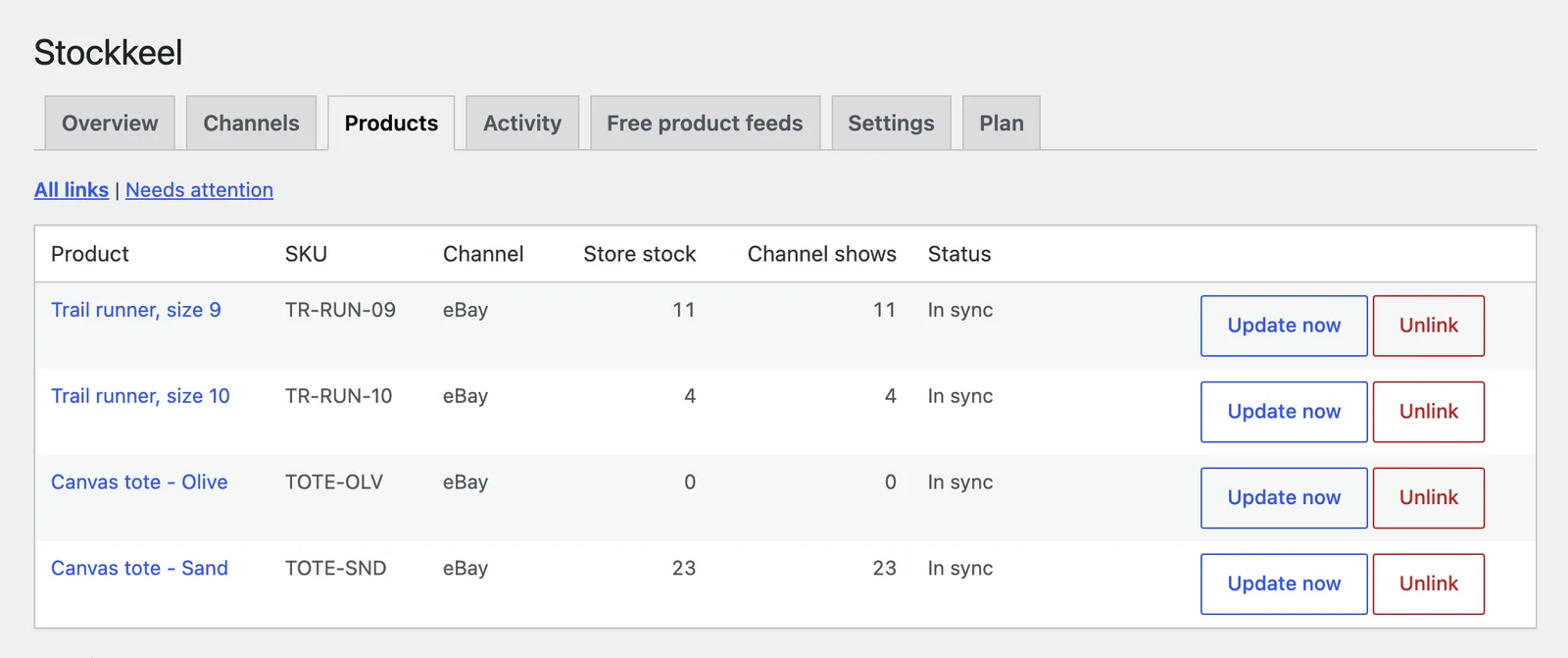
Every channel on every plan
Plans differ only in how many marketplace orders a month are copied into WooCommerce. Orders from your own store never count.
Questions
Something else? Email [email protected] and we reply.
How fast does stock update on the other channels?
When stock changes in your store, Stockkeel sends the new quantity to every channel within about a minute. Orders placed on a marketplace are picked up every 5 minutes by default, because eBay does not notify your site of new orders. For fast sellers, hold back a few units on a channel to cover that gap.
Which channels can I connect today?
Live today: eBay, for stock sync incl. Seller Hub listings and variations, order import, shipment confirmation, publishing simple products; Product feeds, for Google Merchant Center, Microsoft Merchant Center, Meta, Pinterest, Snapchat, TikTok. Early access, in the plugin and being checked against live seller accounts: Mirakl marketplaces, Amazon, Walmart, Etsy, Temu, Newegg, Reverb, Discogs, Faire, Back Market, StockX, bol.com, Cdiscount, ManoMano, ABOUT YOU, Trendyol, Mercado Libre, Coupang, noon and ChatGPT. Coming soon: TikTok Shop, Kaufland, Allegro and Rakuten Ichiba. A channel moves to Live on this page only once it works end to end.
Where are my marketplace keys stored?
In your own WordPress database. Stockkeel calls the marketplace directly from your site. We never receive your keys, your orders or your customers' details.
What counts as an order?
Only orders that come from a marketplace. Orders placed in your own store never count.
What happens if I go over my monthly limit?
Stock keeps syncing on every channel, so you never oversell. Only copying new marketplace orders into WooCommerce pauses until the next month or until you upgrade.
Do my existing eBay listings work?
Yes. Listings created in Seller Hub and listings created through eBay's inventory tools are both supported, including variations. They are linked to your products by SKU.
What if I uninstall Stockkeel?
Your listings stay as they are on each marketplace and your imported orders stay in WooCommerce. Deleting the plugin removes its settings, keys and activity log from your site.
Is there a Shopify version?
Not yet. Stockkeel works with WooCommerce today.
Start with your next 50 orders, free
Install the plugin, connect your marketplace, and watch one stock count follow every sale.